Labiba Campus AI

Turn every university book into a learning journey that understands the student

An intelligent university learning portal that brings digital books, chapters, resources, practice and progress together, with source-grounded AI assistance inside approved academic content.

Because students do not simply need a larger library. They need a clearer path to understand, practise and progress.

Digital libraryChapters and practiceProgress insightSource-grounded AI
A university student learning through connected digital books, practice, progress and artificial intelligence
From content to understanding, in one connected experience
A platform for people and decisions

Three outcomes. One connected learning journey.

Students lose less time finding their way, faculty can support them earlier and the university can see where content becomes real learning.

01

For the student

A calm route through the book: where to begin, what is complete, what needs practice and what to do next.

02

For faculty

A clearer view of engagement and difficult concepts, with tools for resources, practice and timely support.

03

For academic leadership

Comparable signals across content and cohorts, helping teams improve the journey rather than merely count logins.

Calm, structured learning

Every chapter shows students what they need to move forward

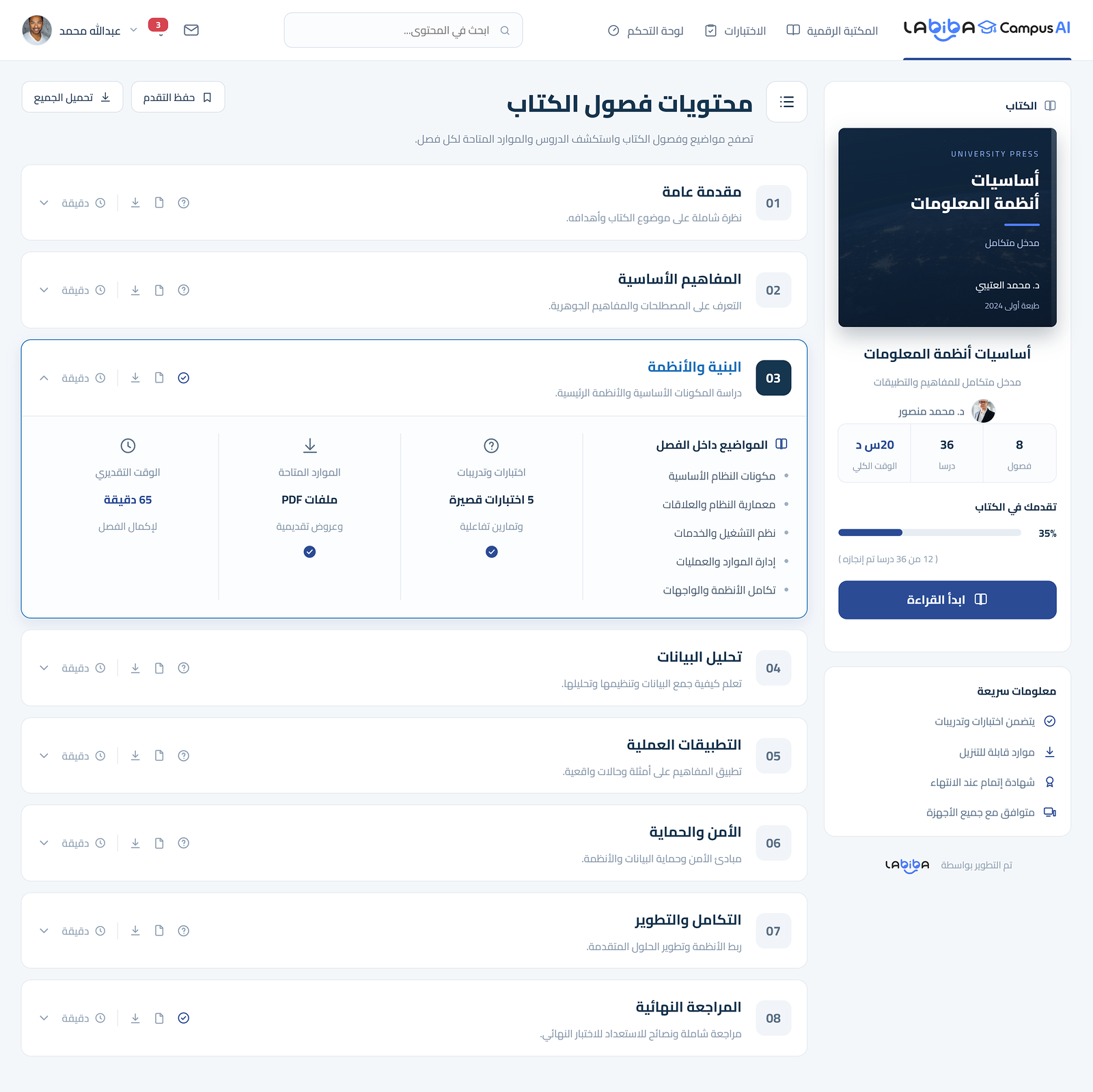
Content, estimated time, resources, practice and progress sit in one daily experience designed across devices.

University learning portal showing book chapters, resources, practice and student progress
Product concept showing chapter content, resources, practice and progress
A connected learning system

Capabilities spanning content, learning and insight

Each capability supports the same student journey and is configured around the university's approved scope.

01

Structured digital library

Brings approved books, references and learning resources into a structured library with role-aware access.

02

Chapter-based learning journeys

Turns each title into chapters, topics, resources and estimated study time so students always know what comes next.

03

Cross-device reader and saved progress

Provides a comfortable cross-device reader that saves position, progress and bookmarks.

04

Chapter-linked practice and assessment

Connects questions and practice to the relevant chapter, with timely feedback that helps students close knowledge gaps.

05

Student progress dashboard

Shows students what they have completed, what remains and the next useful action.

06

Academic and operating insight

Gives academic and operating teams role-based views of engagement, progress, friction and content use.

07

Content publishing and version control

Organises publishing, review, approval and versioning so students study the intended edition.

08

University-ready integration

Prepares SSO, SIS, LMS and library integrations after validating interfaces, permissions and responsibilities.

AI designed to support learning

Not a quick answer, but assistance whose source can be understood and reviewed

The AI assistant works within authorised content, surfaces context and confidence where useful, and keeps academic decisions with the authorised person.

01

Source-grounded study assistant

Answers within the approved book or course corpus, with the passage and source kept visible for verification.

02

Semantic discovery

Finds the relevant concept even when a student's wording differs from the chapter heading or index.

03

Progressive explanations

Reframes a difficult idea, defines prerequisites and builds understanding in smaller steps without replacing faculty judgment.

04

Review notes and concept maps

Suggests concise revision notes and connections between concepts for human review and student study.

05

Adaptive guided practice

Suggests chapter-aligned questions based on progress and observed gaps, with review before any formal use.

06

Early friction signals

Highlights stalled progress, repeated attempts or recurring difficulty so an authorised academic can intervene sooner.

07

Faculty and author assistance

Helps draft learning outcomes, activity ideas and question banks from approved content, while preserving academic approval.

08

Explainable learning insight

Connects patterns to chapters, activities and recorded events instead of presenting unexplained scores or labels.

Academic guardrails by designApproved sourcesVisible access rulesHuman reviewTraceable activityClear use boundaries
From book to mastery

Keep the learning context through every step

  1. 01

    Discover

    Course books and connected resources.

  2. 02

    Read

    Chapters, topics and saved progress.

  3. 03

    Ask

    AI assistance grounded in approved material.

  4. 04

    Practise

    Short activities and useful feedback.

  5. 05

    Progress

    A clear view of completion and what comes next.

Ready for the university environment

Engaging for students. Governable for the institution.

Deployment, integration, security and data requirements are confirmed in the technical scope; no connector or environment is assumed before validation.

Within the platform

Learning experience

  • Library, chapters and resources
  • Reading, saved progress and bookmarks
  • Practice, assessment and feedback
  • Student, academic and leadership views
  • AI assistance over authorised sources
Confirmed by project

Integration and governance

  • Single sign-on, identity and roles
  • SIS, LMS and library interfaces
  • Deployment, backup and recovery
  • Retention, logs and access policies
  • Acceptance, performance and support
Start small. Learn quickly.

One programme can prove the journey before a wider rollout

Choose a representative content set and real users, establish a baseline and success measures, then decide on expansion using evidence rather than assumptions.

Design the first pilot scope
  1. 01
    SelectOne programme and approved content
  2. 02
    PrepareRoles, content and integration needs
  3. 03
    ValidateExperience, AI quality and governance
  4. 04
    DecideImprove, integrate or expand
University questions

What teams need to know before a product demonstration

Does Labiba Campus AI replace the university LMS?

Not necessarily. It can operate as a focused learning and content layer integrated with existing systems, or take a broader role when the approved scope requires it.

Where does the AI assistant get its answers?

From university-approved content available to the user. Sources and relevant context can be displayed according to the configured experience.

Can it generate questions and assessments?

It can be configured to suggest chapter-aligned questions and practice. Formal assessment content remains subject to the university's human review and approval process.

Does it support Arabic and English content?

The experience is designed for Arabic and English content. Exact content formats, search quality and additional languages are validated with representative university material.

Does it work on mobile and tablet devices?

The responsive web experience is designed for modern phones, tablets and desktops. Supported browsers and any offline requirement are confirmed within the project.

How are roles and student data protected?

Roles, content access, analytics visibility, retention and audit requirements are agreed before implementation and configured around the university's approved policies.

Can it integrate with SIS, LMS and library systems?

Yes, after validating interfaces, identity, permissions, data fields, rate limits and each party's responsibilities.

How can a university start with lower risk?

Begin with one programme or a small approved content set, defined users and success measures, then expand only after evidence and feedback support the decision.

A clear first step

What if your university library became a learning journey whose impact you can see?

Share a sample of your content, current systems and target outcome. We will propose a focused first scope that can be tested and reviewed.